
Lesson 5.2: What are the Vector Databases Options available?
Mastering RAG - Brain Friendly Way; Module 5: Vector Databases

“We need to pick a vector database. There are 30+ options. Half the internet says Pinecone, the other half says just use pgvector. How do I actually decide?”
In our previous lesson, we explored how storage mechanisms like sharding, partitioning, caching, and replication shape the performance and scalability of your vector database. Now comes the question that paralyzes nearly every RAG practitioner: with 30+ vector database options on the market, how do you actually choose the right one? In this lesson, we’ll cut through the noise by categorizing every major vector database into five distinct architectural types - Managed Cloud, Self-Hosted Open Source, Embedded/Local, Database Extensions, and Serverless and give you a practical decision framework based not on hype or benchmarks, but on your team’s reality, your scale, and your operational constraints.
The Five Categories of Vector Databases
Before comparing individual products, you need to understand the categories they fall into. This is the single most clarifying mental model for the decision.
Every vector database fits into one of five architectural categories. Each category makes a fundamental trade-off between control, cost, and operational burden.
Category 1: Managed Cloud
Examples: Pinecone (managed), Zilliz Cloud
Here, you don’t run anything. The vendor handles infrastructure, scaling, backups, upgrades and security patches. You get an API endpoint and SDK. You send vectors in. You query vectors out.
Pros:
Zero operational overhead. No servers to manage. No Kubernetes to wrangle.
Scales without you thinking about it.
Built-in monitoring, auth, and encryption.
Your team can focus entirely on the application layer.
Cons:
Higher cost per query and per GB stored.
Less control over indexing parameters, hardware selection, and performance tuning.
Vendor lock-in. Your data lives on their infrastructure.
Limited customization. You get what they offer.
Category 2: Self-Hosted Open Source
Examples: Weaviate, Qdrant, Milvus
In this, you download the software and run it yourself, on your own servers, your own cloud VMs, or your own Kubernetes cluster. You get full access to configuration, indexing parameters, and deployment topology.
Pros:
Full control over everything: hardware, network, tuning, data residency.
No per-query pricing. You pay for compute, not API calls.
Can be significantly cheaper at scale.
No vendor lock-in on the infrastructure layer.
Cons:
You own the operations. Upgrades, monitoring, failover, and backups are all on you.
Requires infrastructure expertise. Someone needs to know Kubernetes, or at least Docker and load balancers.
Scaling requires manual intervention or custom automation.
When it breaks at 2am, your team is the one who fixes it.
Category 3: Embedded / Local
Examples: Chroma, LanceDB, FAISS
Here, the database runs inside your application process. No separate server. No network calls. You import a library, create an index, and query it all in the same Python script.
Pros:
Zero setup.
pip install chromadband you’re running.No network latency. Everything happens in-process.
Perfect for prototyping, testing, and local development.
Great for small datasets (thousands to low millions of vectors).
Cons:
Doesn’t scale horizontally. Bound by a single machine’s memory and disk.
No built-in replication or high availability.
Not designed for concurrent multi-user production workloads.
Migration to a production database is inevitable if you grow.
Category 4: Extension to Existing Database
Examples: pgvector (PostgreSQL), Redis Vector Search, Elasticsearch/OpenSearch kNN
Here, you don’t add a new database to your stack. You add vector capabilities to a database you already run. Your vectors live alongside your relational data, your caches, or your search indices.
Pros:
No new infrastructure to deploy or manage.
Vectors and metadata live in the same system. Joins, transactions, and filtering are native.
Your team already knows how to operate, monitor, and debug it.
Simpler architecture. Fewer moving parts. Fewer failure modes.
Cons:
Vector search is a secondary feature, not the primary design goal.
Performance may lag behind purpose-built vector databases at high scale.
Advanced vector features (multi-vector search, hybrid ranking) may be limited.
Scaling vectors means scaling the entire database, not just the vector layer.
Category 5: Serverless
Examples: Pinecone Serverless, Turbopuffer
In this, you don’t provision capacity. You don’t pay for idle resources. You pay per query and per GB stored. The system scales to zero when unused and spins up when needed.
Pros:
Pay only for what you use. No idle costs.
Scales automatically with traffic.
Great for bursty or unpredictable workloads.
No capacity planning required.
Cons:
Cold start latency. If your index hasn’t been queried recently, the first query may be slow.
Less predictable performance under sustained high load.
Cost can spike unpredictably with traffic surges.
Less control over where data is stored and how it’s indexed.
Feature Comparison Matrix
Now let’s get specific. Here’s how the major players compare across the features that actually matter in production RAG applications.
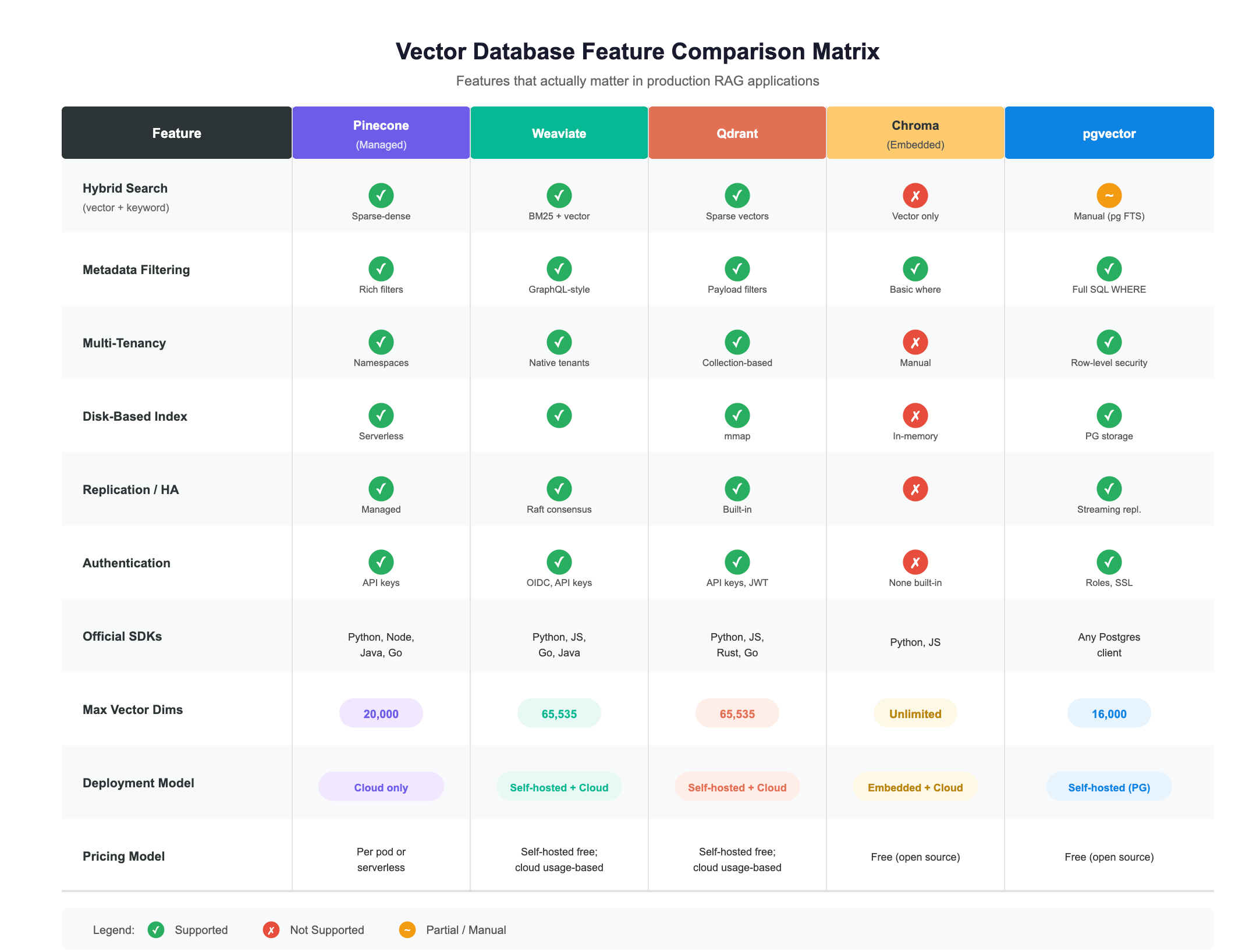
What the Matrix Doesn’t Tell You
Feature checkboxes are necessary but not sufficient. Two databases can both check “Hybrid Search” and deliver wildly different experiences.
What actually differentiates them in practice:
Query latency at YOUR scale. A database that’s fast at 100K vectors may crawl at 100M.
Operational maturity. How good are the docs? How active is the community? How fast do they fix bugs?
Ecosystem integration. Does it plug cleanly into LangChain, LlamaIndex, or your custom framework?
Failure modes. What happens when a node dies? When disk fills up? When a query times out? How debuggable is it?
Upgrade path. Can you upgrade without downtime? Do schema changes require reindexing?
The Decision Framework
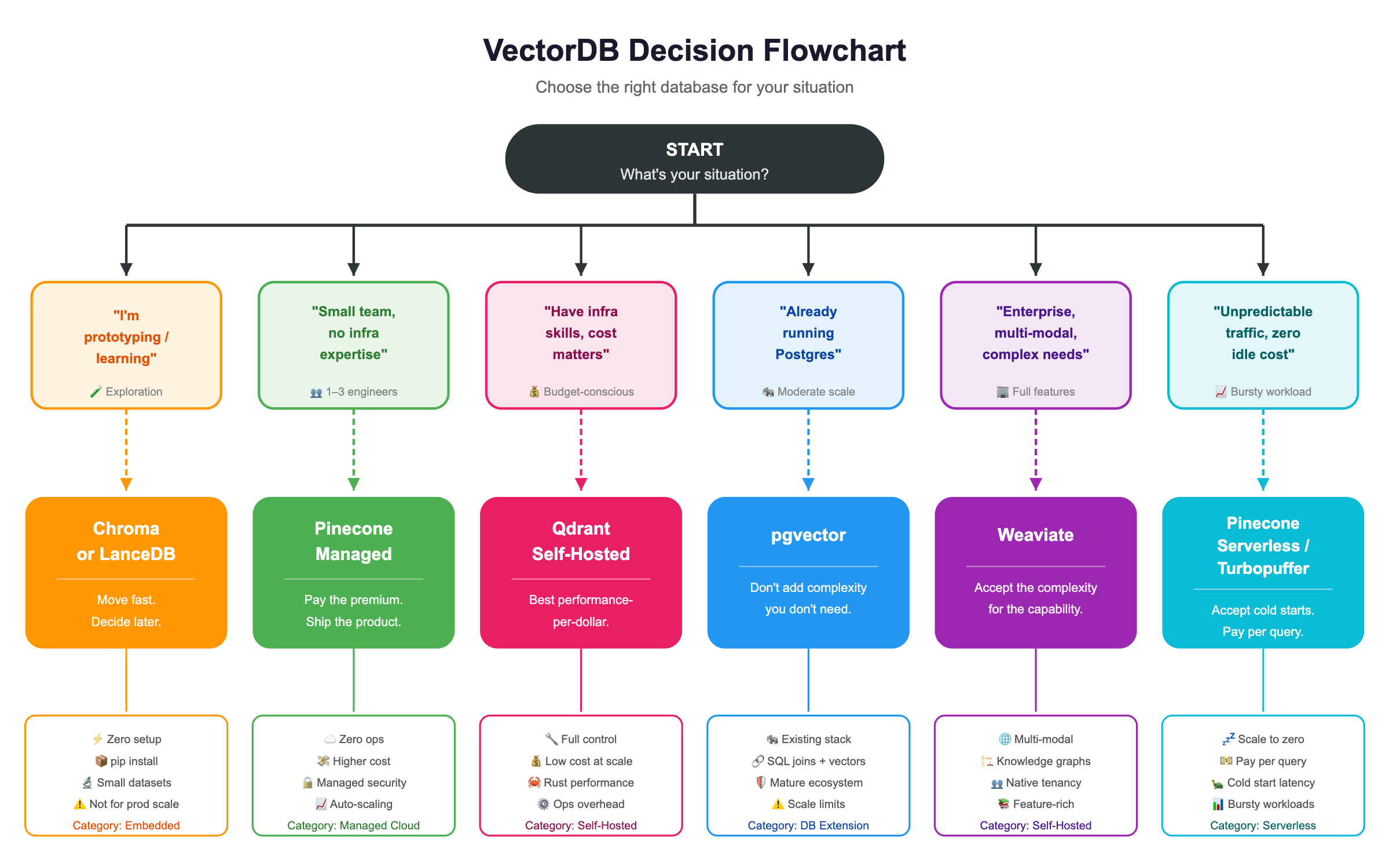
Here’s the framework I wish someone had given me. It’s not based on benchmarks or feature lists. It’s based on the question that actually determines success:
“Given my team, my scale, and my constraints, which database can we operate reliably?”
Scenario 1: Prototype / Local Development
→ Use Chroma or LanceDB
You’re exploring and iterating fast. You need something running in under a minute. You don’t care about scale, availability, or multi-tenancy yet.
Example:
# You’re up and running in 4 lines
import chromadb

client = chromadb.Client()
collection = client.create_collection(”my_docs”)
collection.add(documents=[”Hello world”], ids=[”doc1”])
results = collection.query(query_texts=[”greeting”], n_results=1)
Scenario 2: Production, Team of 1–3, No ML Infra Expertise
→ Use Pinecone Managed
You’re a small team and you’re building a product, not operating infrastructure. You don’t have a dedicated DevOps person. You don’t want to learn Kubernetes to ship a feature.
Pinecone gives you an API. Everything else is handled for you. Yes, it costs more per query. But your time costs more than their markup.
When to reconsider: When your monthly Pinecone bill exceeds what a dedicated VM would cost, and you’ve hired someone who can operate infrastructure.
Scenario 3: Production, Control + Cost Matter
→ Use Qdrant Self-Hosted
You have infrastructure experience on the team. You want to control costs. You want to tune performance. You’re comfortable running Docker or Kubernetes.
Qdrant gives you excellent performance, a clean API, Rust-based efficiency, and a straightforward operational model. The community is active. The docs are solid. And you’re not paying per query.
Example- YAML
# docker-compose.yml — production Qdrant in minutes
services:
  qdrant:
    image: qdrant/qdrant:latest
    ports:
      - “6333:6333”
    volumes:
      - ./qdrant_data:/qdrant/storage
    environment:
      - QDRANT__SERVICE__API_KEY=your-secret-key
When to reconsider: When you need advanced features like built-in knowledge graph traversal, or when operational burden starts slowing down feature development.
Scenario 4: Already on Postgres
→ Use pgvector (If Scale Allows)
You already run Postgres. Your team knows Postgres. Your monitoring, backups, and failover are already configured for Postgres.
Adding pgvector means adding vector search without adding a new database to your architecture. Your vectors live next to your relational data. You can JOIN them. You can filter with SQL. You can use transactions.
Example- SQL
-- Enable the extension
CREATE EXTENSION vector;

-- Create a table with a vector column
CREATE TABLE documents (
  id serial PRIMARY KEY,
  content text,
  embedding vector(1536)
);

-- Create an index for fast similarity search
CREATE INDEX ON documents USING ivfflat (embedding vector_cosine_ops)
  WITH (lists = 100);

-- Query with a filter — this is where pgvector shines
SELECT content, embedding <=> ‘[0.1, 0.2, ...]’::vector AS distance
FROM documents
WHERE category = ‘engineering’
ORDER BY distance
LIMIT 10;
The honest limitation: pgvector works beautifully up to a few million vectors with moderate QPS. Beyond that, purpose-built vector databases will outperform it. The crossover point depends on your hardware, your index type, and your query patterns.
When to reconsider: When query latency at P95 exceeds your SLA, or when you need features like built-in hybrid search that would require complex manual implementation in Postgres.
Scenario 5: Enterprise, Multi-Modal, Knowledge Graph Features
→ Use Weaviate
You need more than vector search. You need multi-modal support (text, images, audio). You need built-in vectorization modules. You want GraphQL-style querying. You need native multi-tenancy for enterprise customers.
Weaviate is the most feature-rich option. It’s also the most complex to operate. But for enterprise use cases with diverse data types and complex access patterns, that complexity pays for itself.
When to reconsider: When you realize you’re only using 20% of Weaviate’s features and paying the operational cost of the other 80%.
The Decision Flowchart
The Operational Reality Check
Let me end with the most important thing I’ve learned, the thing that no feature comparison or benchmark will tell you:
It doesn’t matter if Database X is 15% faster on a synthetic benchmark. What matters is:
Can your on-call engineer diagnose a slow query at 2am without reading a 50-page manual?
Can you restore from backup in under an hour when something goes wrong?
Can you upgrade without a maintenance window?
Can you explain the failure mode to your VP of Engineering in plain English?
Can you hire people who know how to operate it?
I’ve seen teams choose the technically superior option and spend six months fighting operational issues. I’ve seen teams choose the boringo ption (pgvector, Pinecone) and ship features every week because they never think about their database.