
How to choose the right embedding model for your RAG application?
A Comprehensive Guide to Selecting the Ideal Embedding Model for Your RAG Application

Retrieval-Augmented Generation (RAG) is right now the most popular framework for building GenAI apps. Enterprises and organisations love it as it allows them to use their proprietary data to answer user questions. It makes LLM give users answers that are accurate, current, and relevant to their questions.
From my experiences of building RAG Apps for a couple of years, the quality of your responses depends a lot on the retrieved context.
And one key way to improve the retrieved context for RAG is chunking the data at the right size, choosing the right embedding models, and choosing an effective retrieval mechanism.
Embeddings are the backbone of LLMs. When you prompt an LLM to help you debug your code, your words and tokens are transformed into a high-dimensional vector space where semantic relationships become mathematical relationships using embedding models. If you use the wrong embedding model, your RAG application might fetch unrelated or messy data. This can lead to bad answers, higher costs, and unhappy users.
In this blog, I’ll explain what embeddings are, why they matter, and what you should consider when choosing one. We’ll also look at different embedding models and which ones fit certain situations. By the end, you’ll have a clear idea of how to pick the right embedding model to boost accuracy and keep your RAG app running smoothly.
What Are Embeddings?
Embeddings are the numeric representation that captures the meanings and patterns in language. These numbers help your system find information that’s closely related to the question or topic
These embeddings are created using an Embedding model. Embedding model takes words, images, documents, even sounds, and turns it into a series of numbers called a vector.
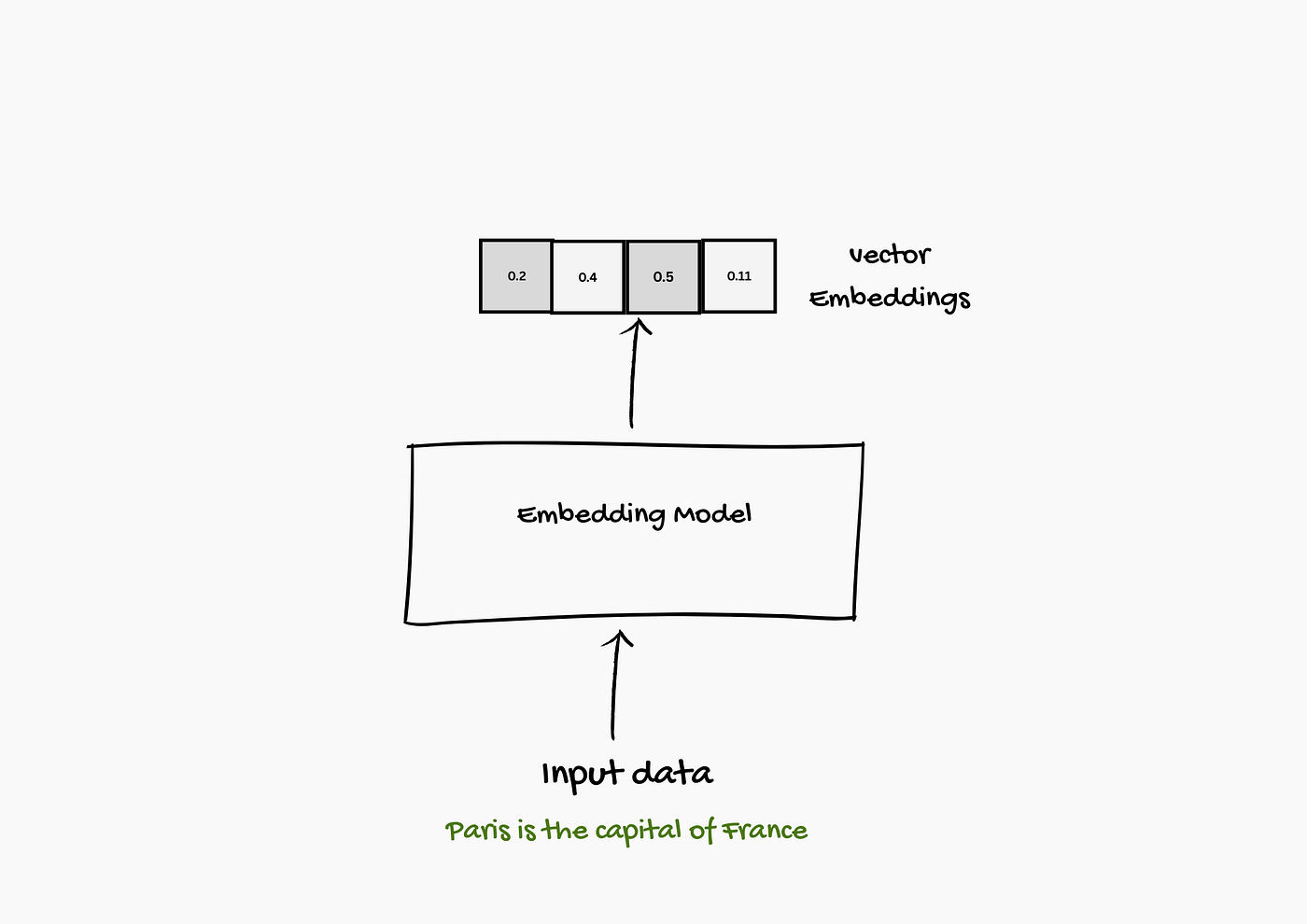
You might have learned about embeddings in the context of large language models, but embeddings actually have a much longer history.
How are these embeddings calculated?
Mostly, embeddings are created using Language models currently.
Instead of representing each token or word with a static vector, language models create contextualized word embeddings that represent a word/sentence/chunk with a different token based on its context. These vectors can then be used by other systems for a variety of tasks.
There are multiple ways of producing a text embedding vector. One of the most common ways is to average the values of all the token embeddings produced by the model. Yet high-quality text embedding models tend to be trained specifically for text embedding tasks.
We can produce text embeddings with sentence-transformers, a popular package for leveraging pretrained embedding models
from sentence_transformers import SentenceTransformer

# Load model
model = SentenceTransformer(”sentence-transformers/all-mpnet-base-v2”)

# Convert text to text embeddings
vector = model.encode(”Best movie ever!”)
The number of values, or the dimensions, of the embedding vector depends on the underlying embedding model. The dimension of the embedding vector could be found using vector.shape method
Why Are Embeddings Important in RAG?
Embeddings play a key role in Retrieval-Augmented Generation (RAG) systems. Here’s why:
Semantic Understanding: Embeddings turn words, sentences, or documents into vectors (lists of numbers) in a way that puts similar meanings close together. This helps the system understand context and meaning, not just match exact words.
Efficient Retrieval: RAG needs to quickly find the most relevant passages or documents. Embeddings make search faster and easier, often using algorithms like k-nearest neighbors (k-NN).
Better Accuracy: With embeddings, the model can spot information that’s related to your question, even if it doesn’t use the same words. This means you get more accurate and relevant answers.
Types of Embeddings
Embeddings come in several forms, depending on what information your system needs to handle.
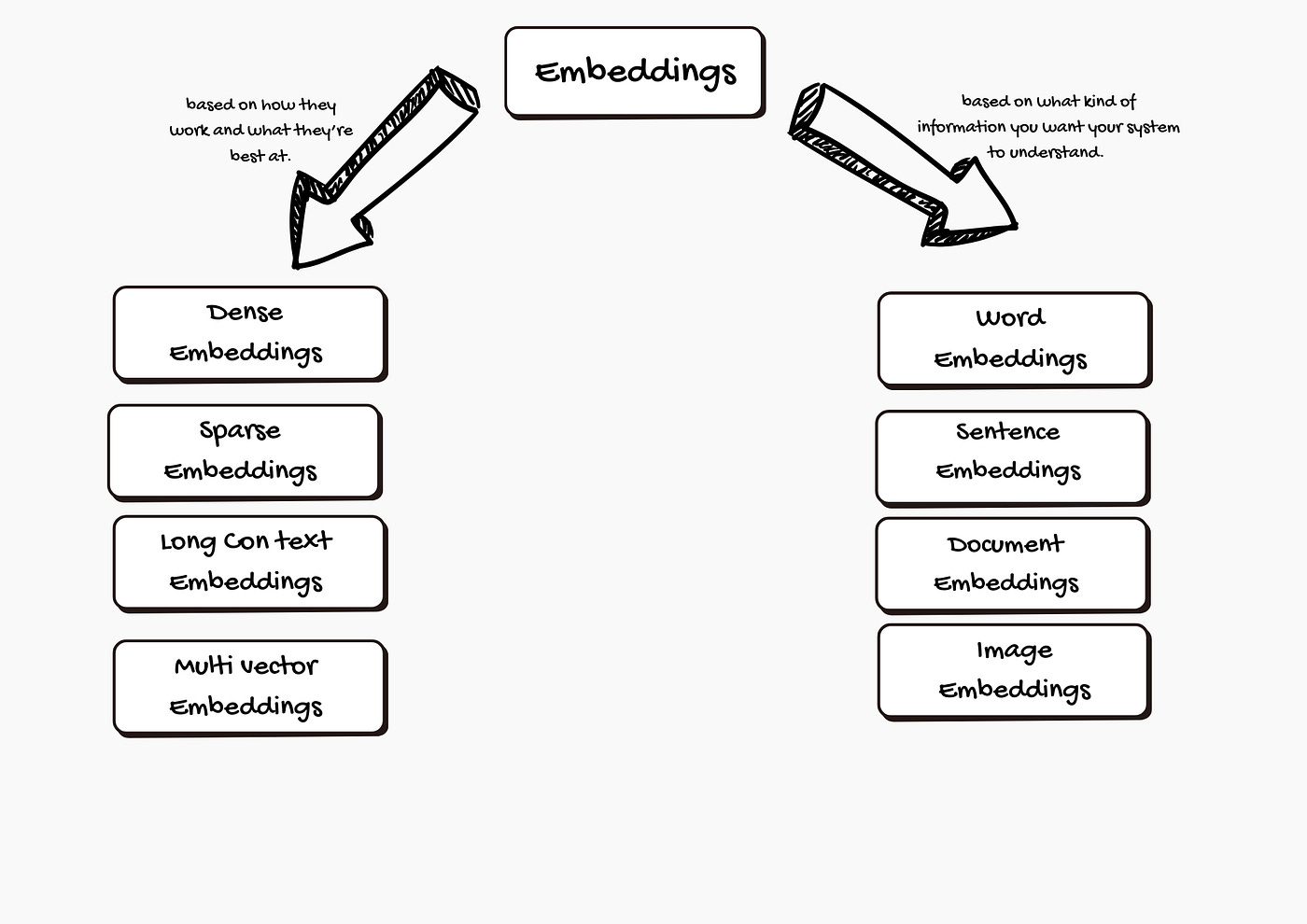
1. Based on what kind of information you want your system to understand:
1.1 Word Embeddings
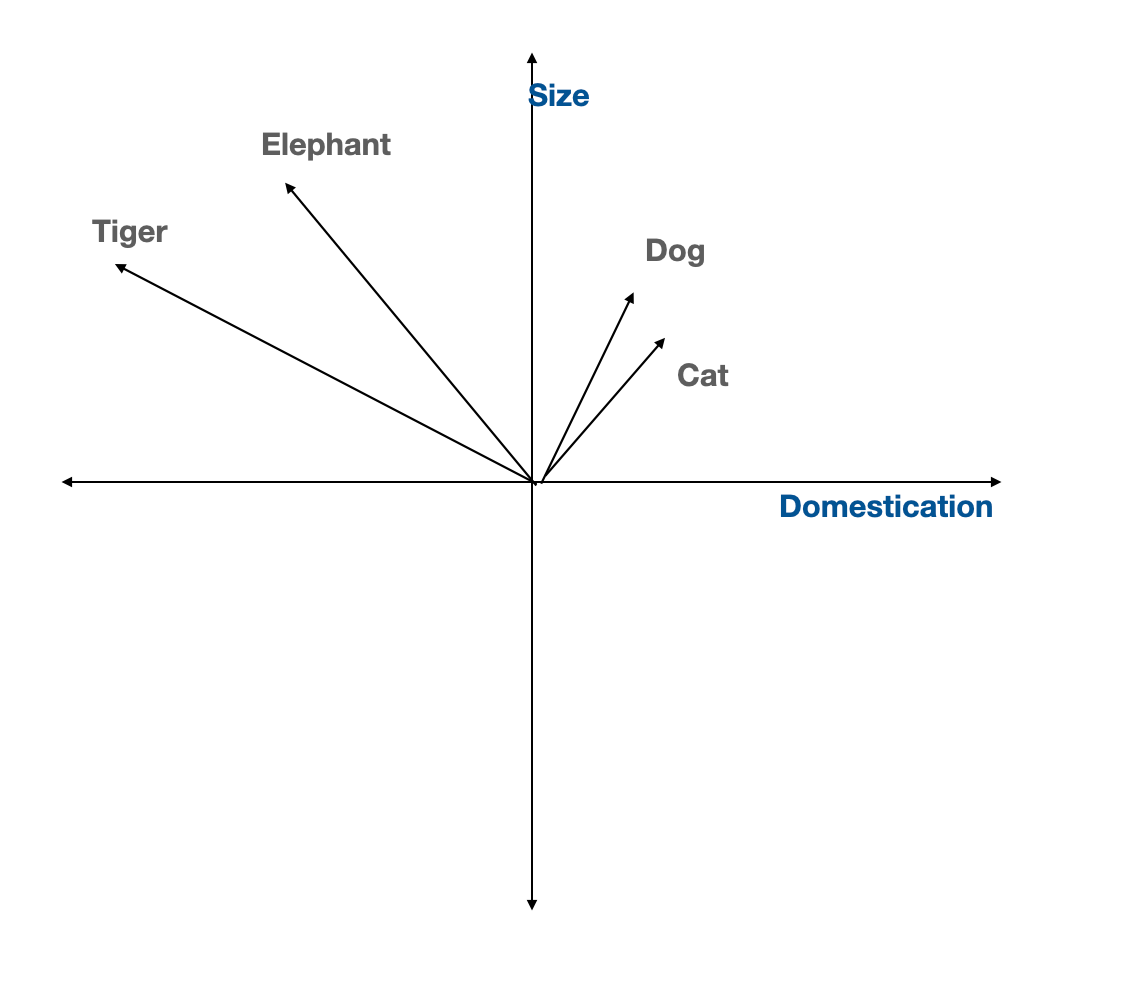
Word embeddings represent each word as a point in a multi-dimensional space. Words with similar meanings like “dog” and “cat”en d up close together. This helps computers understand the relationships between words, not just their spelling.
Popular word embedding models include:
Word2Vec: Learns word relationships from large amounts of text.
GloVe: Focuses on how often words appear together.
FastText: Breaks words into smaller parts, making it better at handling rare or misspelled words.
1.2 Sentence Embeddings
Sometimes, the meaning could be learnt from only the whole sentence, not just single words. Sentence embeddings capture the overall meaning of a sentence as a vector.
Well-known sentence embedding models are:
Universal Sentence Encoder (USE):Works well with all types of sentences, including questions and statements.
SkipThought: Learns to predict surrounding sentences, helping the model understand context and intent.
1.3 Document Embeddings
A document can be anything from a paragraph to a whole book. Document embeddings turn all the text into a single vector. This makes searching through large collections of documents easier and helps find content related to your query.
Leading document embedding models include:
Doc2Vec: Builds on Word2Vec, but is designed for longer texts.
Paragraph Vectors: Similar to Doc2Vec, but focuses on shorter text sections like paragraphs.
1.4 Image Embeddings:
Text isn’t the only type of information RAG systems can work with images. Image embeddings turn a picture into a list of numbers that describe colors, shapes, and patterns.
Popular image embedding model is Convolutional Neural Networks (CNNs). It is especially good at spotting patterns in images.
2. Based on the characteristic of the embedding:
Embeddings can have different qualities that affect how they work and what they’re best at. Let’s break down these characteristics with simple explanations and examples:
2.1. Dense Embeddings
Dense embeddings use vectors where almost every number is filled in with a value. Each value holds a bit of information about the word, sentence, image, or document. Dense vectors are compact and efficient. They store a lot of details in a small space. This makes it easier for computers to compare things and find similarities quickly.
2.2. Sparse Embeddings
Sparse embeddings are the opposite of dense. Most of the numbers in the vector are zero, and only a few spots have actual values. The zeros don’t carry any information. Sparse embeddings help highlight just the most important features. They can make it easy to spot what makes something unique or different from others.
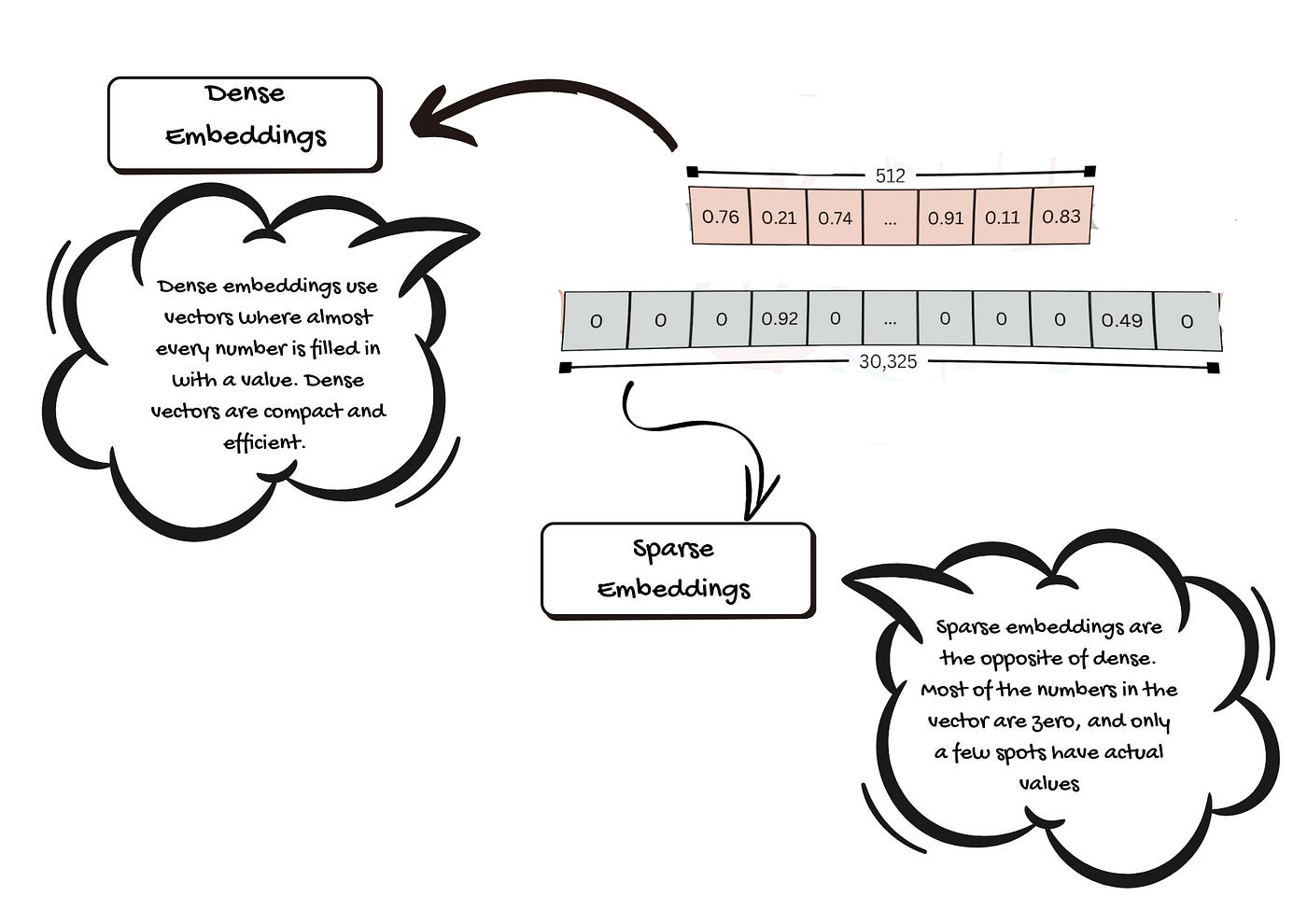
Dense and Sparse Embeddings — Image by Author
2.3 Long Context Embeddings
Sometimes, you need to understand a whole document or a long conversation, not just a short sentence. Long context embeddings are designed to handle large amounts of text at once.
Older models could only look at short texts. If you gave them a big article, they had to break it up into smaller parts. This could make them miss important connections or lose track of the main idea. New models, like BGE-M3, can take in thousands of words at once (up to 8,192 tokens). This helps the computer keep the full story together.
2.4 Multi-Vector Embeddings
Usually, one item (like a word or document) gets just one vector. Multi-vector embeddings use several vectors for each item. Each vector can capture a different feature or aspect.
With more than one vector, the computer can notice more details and relationships. This leads to richer and more accurate results.
Parameters for Choosing the Best Text Embedding Model
Before picking a model, you should know what to look for. There are several key factors to consider:
1. Context Window
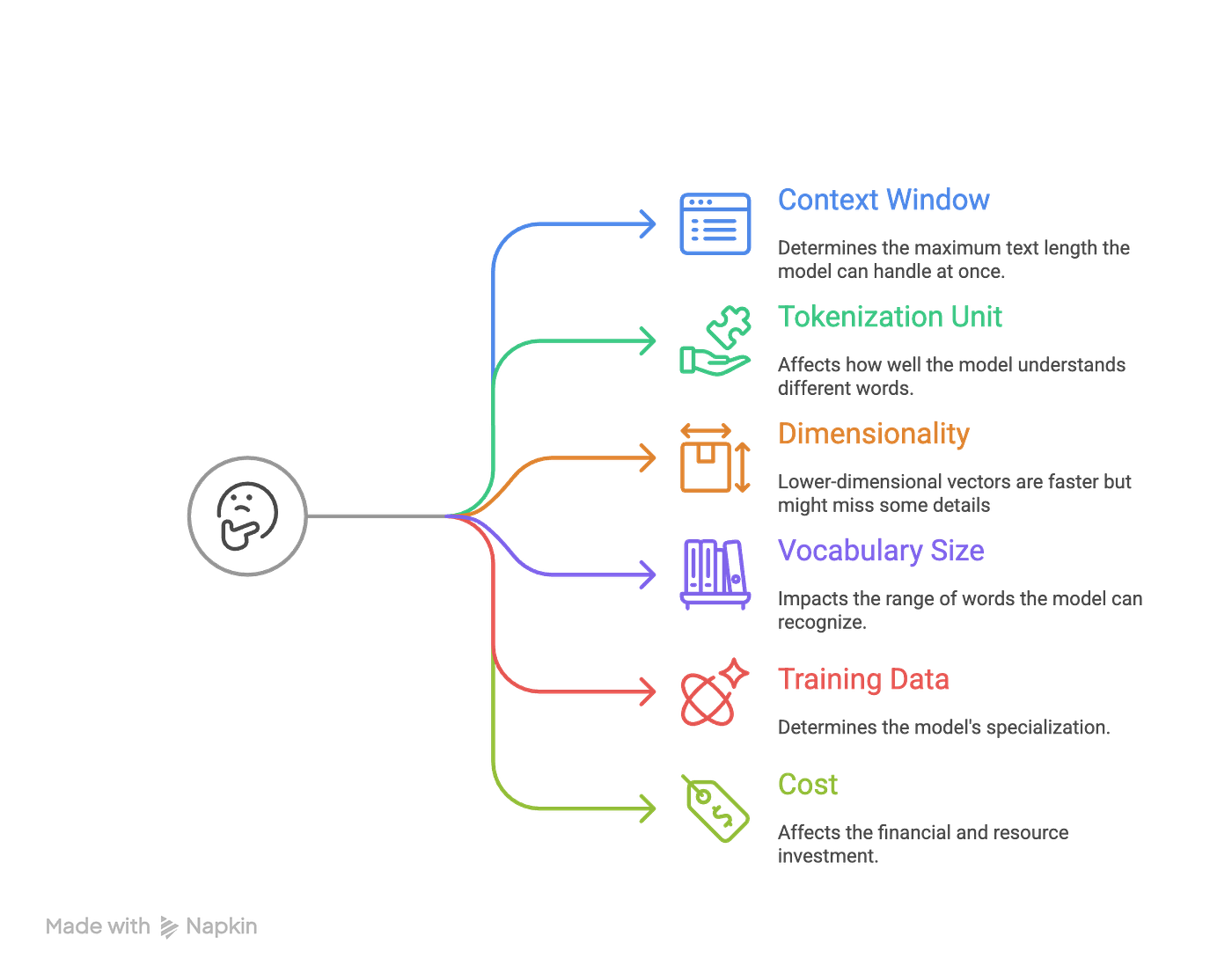
The context window is the maximum amount of text the model can handle at one time. For example, if a model has a context window of 512 tokens, it can only read 512 words or pieces of words at once. Longer texts must be split up. Some models, like OpenAI’s text-embedding-ada-002 (8192 tokens) and Cohere’s embedding model (4096 tokens), can handle much longer texts.
Why is this important?
A larger context window lets you process bigger documents without losing information. This is helpful for tasks like searching long articles or research papers, or reports.
2. Tokenization Unit
Tokenization is how the model breaks text into smaller parts, called tokens. Different models use different methods:
Subword Tokenization (Byte Pair Encoding, BPE): Splits words into smaller pieces. For example, “unhappiness” becomes “un” and “happiness.” This helps with rare or new words.
WordPiece: Similar to BPE, but often used in models like BERT.
Word-Level Tokenization: Splits text into whole words. Not as good for rare words.
Why is this important?
The way a model tokenizes text affects how well it understands different words, especially unusual ones. Most modern models use subword tokenization for better flexibility.
3. Dimensionality
Dimensionality is the size of the number list (vector) the model creates for each piece of text. For example, some models produce vectors with 768 numbers, others with 1024 or even 3072.
Why is this important?
Higher-dimensional vectors can store more detailed information, but they need more computer power. Lower-dimensional vectors are faster but might miss some details.
4. Vocabulary Size
This is the number of unique tokens the model knows. Bigger vocabularies handle more words and languages but use more memory. Smaller vocabularies are quicker, but might not understand rare or specialized words.
For example: Most modern models have vocabularies between 30,000 and 50,000 tokens.
5. Training Data
Training data is what the model learned from.
Models trained on General-Purpose: When trained on many types of text, like web pages or books the models become useful for general purposes. Good for broad tasks.
Domain-Specific: When trained on specialized texts, like medical or legal documents, the models become specialized in a specific domain. These are good for niche tasks.
Why is this important?
A model trained on specific data does better in those areas. But it may not work as well for general tasks.
6. Cost
Cost includes money and computer resources needed to use the model. Based on how you plan to access the LLM models the cost structure would vary.
API-Based Models: You pay per use, such as OpenAI or Cohere.
Open-Source Models: Free to use, but you need hardware (like GPUs) and technical skills to run them yourself.
Why is this important?
API models are easy to use, but can get expensive if you have a lot of data. Open-source models save money, but need more setup and know-how.
Key Factors When Choosing an Embedding
1. Know Your Data Domain
From my experience, the first thing I ask when designing a RAG application is, “What kind of data will my RAG system handle?”
If we are working with general knowledge or customer FAQs, general-purpose embeddings like OpenAI’s text-embedding-3-small are usually sufficient. But for specialized fields like medicine, law or finance, domain-specific models such as BioBERT, SciBERT, or Legal-BERT are the best. These models are trained to understand the language and context unique to those areas.
If the RAG tool needs to handle product images or voice queries, go for multimodal embeddings. CLIP is a solid choice for handling both text and images.
2. Embedding Size and Model Complexity
Next I would evaluate whether my queries and documents are short or long, structured or unstructured. Some models are better with brief snippets, while others excel at processing longer, free-form text.
Embedding dimensionality matters a lot. High-dimensional vectors (1536 or 4096 dimensions) capture more subtle differences and context. They generally improve retrieval accuracy but demand more computational resources and storage.
Lower-dimensional vectors (384 or 768 dimensions) are faster and lighter, which is critical if you’re scaling up to millions of documents. The trade-off is simple: more dimensions mean better accuracy but higher costs; fewer dimensions mean speed and efficiency but may sacrifice some precision.
In practice, it’s better to start with vectors in the 384–768 range. This gives you a good balance between performance and resource use.
Modern vector databases like Pinecone, Weaviate, or FAISS can compress embeddings using quantization or dimensionality reduction. These vector DBs let you use larger embeddings without paying the full memory cost.
3. Computational Efficiency
Speed is crucial, especially for real-time applications.
If response time is very crucial for your application, go for models with low inference times. Lighter models like DistilBERT or MiniLM are fast and still accurate enough for most tasks.
4. Contextual Understanding
Next, we should evaluate the queries that RAG systems should answer. The structure and length of the knowledge content/documents. These contents should be chunked into an appropriate optimal size based on the application. One key factor in getting the right answer for a user question is the model’s context window, which is the amount of text it can consider at once.
Larger context windows help when dealing with lengthy or complex documents. Models that can process more text at once tend to deliver more accurate answers for long queries.
5. Integration and Compatibility
It is best to choose models that integrate smoothly with your existing infrastructure.
Pre-trained models from TensorFlow, PyTorch, or Hugging Face are typically easier to deploy and come with strong documentation and community support.
6. Cost
Finally, to estimate the project always weigh both training and deployment costs if you are planning to fine tune the model and host your model. But most of the RAG application could work fine
Larger models are more expensive to train and run. Open-source models are usually more budget-friendly but may require extra setup and maintenance. Proprietary models offer better support and performance but at a higher price.
Scenario: Choosing an Embedding Model for Healthcare Research Papers
Suppose you need to build a semantic search system for healthcare research papers. You want users to be able to find relevant studies quickly and accurately. Your dataset is large, and each document is long, between 2,000 and 8,000 words. You need a model that can process these lengthy texts, provide meaningful results, and stay within a monthly budget of 300$ - 500$.
How do you pick the right embedding model for this job? Let’s walk through the process step by step.
Step 1: Focus on Domain Relevance
Healthcare research papers use complex medical terms and technical language. The model you choose should be trained on scientific or academic texts, not just legal or general content.
So, models designed mainly for legal or biomedical documents won’t be the best fit for wider scientific research.
Step 2: Check Context Window Size
Research papers are long. To process them fully, you need a model with a large context window. Most research papers have between 2,000 and 8,000 words. That’s about 2,660 to 10,640 tokens (assuming 1.33 tokens per word).
A model with an 8,192-token context window can cover roughly 6,156 words at once.
If a model can only handle 512 tokens, it won’t be able to process whole papers.
Models to skip:
Stella 400M v5
Stella 1.5B v5
ModernBERT Embed Base
ModernBERT Embed Large
BAAI/bge-base-en-v1.5
allenai/specter
m3e-base
Step 3: Consider Cost and Hosting
You have a budget. Paying per token can add up quickly, especially with large documents and frequent searches.
Let’s look at some models:
OpenAI text-embedding-3-large: $0.00013 per 1,000 tokens
OpenAI text-embedding-3-small: $0.00002 per 1,000 tokens
Jina Embeddings v3: Open-source and self-hosted, no per-token cost
Let’s run the numbers. If you process 10,000 documents a month (each with 8,000 tokens):
OpenAI text-embedding-3-large: $10.4/month (under budget)
OpenAI text-embedding-3-small: $1.6/month (way underb budget)
Jina Embeddings v3: No per-token cost. But you pay for hosting/server costs (which can be high depending on the server size and whether if you are hosting with another model)
Models to skip:
Jina Embeddings v3
Step 4: Compare Performance (MTEB Score)
Now, look at the remaining models’ actual performance. The Massive Text Embedding Benchmark (MTEB) provides scores to help compare.
OpenAI text-embedding-3-large: Strong performance, Good MTEB score (~71.6), can process up to 8191 tokens, and is cost-effective.
OpenAI text-embedding-3-small: Good performance, Good MTEB score (~69.42), can process up to 8191 tokens, and is cost-effective.
Voyage-3-large: Good MTEB score (~60.5), can process up to 32,000 tokens, and is cost-effective.
NVIDIA NV-Embed-v2: Highest MTEB score (72.31), processes up to 32,768 tokens, open-source and self-hosted.
Our final selection:
After narrowing down the list, you’re left with open-source models like OpenAI text-embedding-3-small, OpenAI text-embedding-3-large, Voyage-3-large, and NVIDIA NV-Embed-v2.
These models can handle long healthcare research papers, offer strong accuracy, and fit your budget.
NVIDIA NV-Embed-v2 stands out for its high MTEB score and large context window, making it a solid choice for healthcare semantic search.
Choosing the right embedding model takes some careful thinking. Look at your needs, compare the options, and pick the one that fits your project best.
Benchmarks for choosing the right Embeddings
There are new and improved embedding models coming out all the time. But how do you keep track of them all? Fortunately, there are large-scale benchmarks that can help you stay informed.
Massive Text Embedding Benchmark (MTEB)
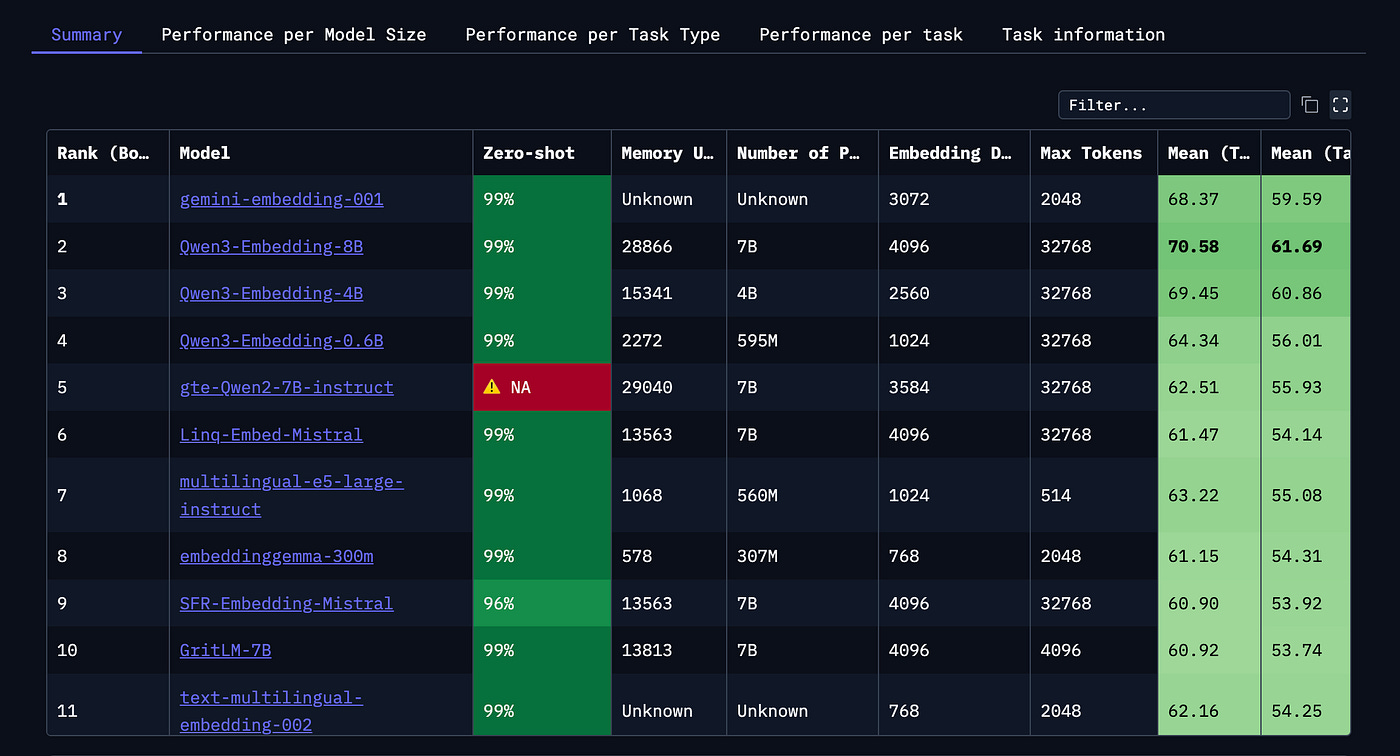
MTEB is a community-run leaderboard. It compares over 100 text and image embedding models across more than 1,000 languages. Everything is in one place — evaluation metrics, different types of tasks, and a wide range of domains. This makes it a useful starting point when you’re deciding which model to use.
links: MTEB Dashboard
Massive Multilingual Text Embedding Benchmark (MMTEB)
Most traditional benchmarks only cover a few languages or domains. MMTEB goes much further. It’s an expanded version of MTEB, now including over 500 evaluation tasks in more than 250 languages. MMTEB also tests tougher challenges, such as instruction following, retrieving information from long documents, and even code retrieval. It’s currently the most thorough multilingual benchmark for embeddings.
links: Research paper
When should you use the Massive Text Embedding Benchmark (MTEB)? And how?
MTEB is a useful tool for picking an embedding model. Different models shine at different tasks. The MTEB leaderboard shows how each model performs across a wide range of tasks. This can help you narrow down your choices for your specific needs.
But, don’t get fooled by MTEB scores alone.
MTEB gives you scores, but it doesn’t tell the whole story. The differences between top models are often very small. These scores come from many tasks, but you don’t see how much the results vary from task to task. Sometimes, the model at the top of the leaderboard only has a slight edge. Statistically, several top models may perform equally well. Researchers have found that average scores don’t always mean much when models are so close.
What should you do instead? Look at how models perform on tasks similar to your use case. This is usually more helpful than just focusing on the overall score. You don’t need to study every dataset in detail. But knowing what kind of text is used — like news articles, scientific papers, or social media posts — can help. You can find this information in the dataset descriptions or by glancing at a few examples.
MTEB is a helpful resource, but it’s not perfect. Think critically about the results. Don’t just pick the highest-scoring model. Look deeper to find the best fit for your task.
Consider your application’s needs. There’s no single model that’s best for everything. That’s why MTEB exists, to help you choose the right one for your situation. When you’re browsing the leaderboard, keep these questions in mind:
What language do you need? Does the model support it?
Are you working with specialized vocabulary, like financial or legal terms?
How big is the model? Can it run on your hardware, like a laptop?
How much memory does your computer have? Will the model fit?
What’s the maximum input length? Are your texts long or short?
Once you know what matters most for your project, you can filter the models on the MTEB leaderboard by these features. This helps you find a model that not only performs well but also suits your practical needs.
Closing Thoughts:
Choosing the right embedding model for your RAG application isn’t just about picking the one with the highest score on a benchmark. Tools like MTEB are helpful, but they can’t tell you everything. It’s important to look beyond the numbers and consider what really matters for your project, like language support, specialized vocabulary, memory limits, and text length.
Take time to understand your use case. Compare models based on the tasks most relevant to you. Remember, a model that works well for one person’s application might not be the best fit for yours.
In the end, a thoughtful approach is balancing performance with practical needs. This will help you find the model that’s right for you. With a little research and careful consideration, you’ll set your RAG application up for success.
The idea that semantic relationships turn into mathematical ones thanks to embeddings really stuck with me. How do you feel about the practical tradeoffs when aiming for that 'perfect' embedding model, especially considering how rapidly new ones emerge? This was a super insightful breakdown, making a complex topic feel really accesible.